
A hot-swappable keyboard lets you remove and replace compatible switches without desoldering them from the PCB.
That sounds simple, but it changes how you can own and upgrade a mechanical keyboard. Instead of committing to one switch for the life of the board, you can replace a broken switch, try a different feel, or change an entire set with a switch puller.
The important word is compatible.
Hot-swappable does not mean every switch works in every keyboard. Mechanical, optical, and magnetic Hall Effect keyboards can use different sensing systems and socket designs. Even within traditional mechanical keyboards, you still need to check things such as 3-pin vs 5-pin support and the switch family the PCB was designed to accept.
This guide explains what hot-swappable means, how hot-swap sockets work, what switches you can use, and the mistakes to avoid before you pull your first switch.
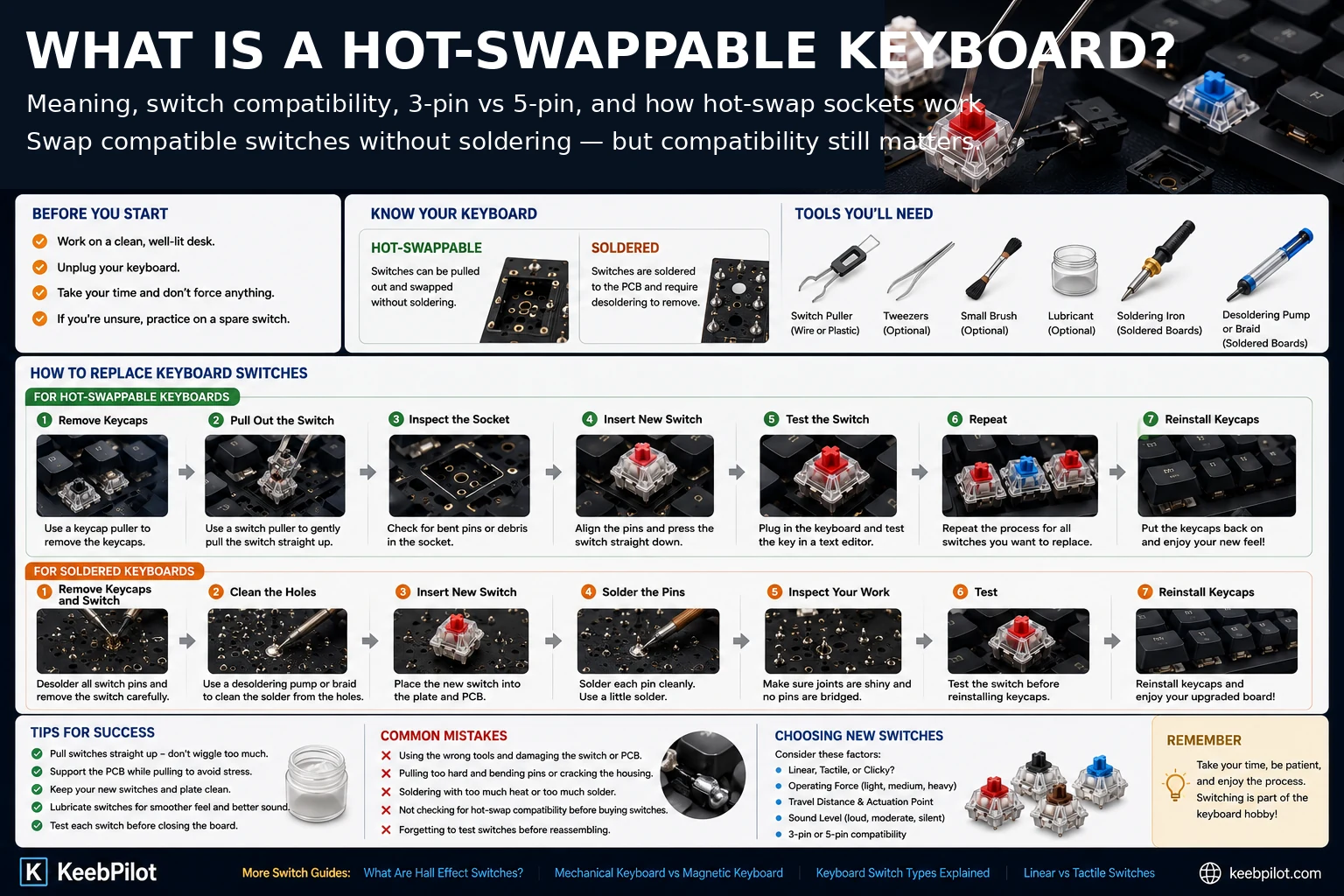
What Does Hot-Swappable Keyboard Mean?
A hot-swappable keyboard has sockets mounted on its printed circuit board, or PCB, that allow compatible switches to be installed and removed without soldering each switch directly to the board.
On a traditional soldered mechanical keyboard, the metal switch pins pass through the PCB and are fixed in place with solder. Replacing the switch normally requires opening the keyboard, desoldering those joints, removing the old switch, installing the replacement, and soldering it back in.
A hot-swap PCB replaces that permanent solder connection with a socket.
You remove the keycap, grip the switch with a switch puller, pull the switch out, line up the replacement, and press it into the socket.
That is the basic meaning of a hot swappable keyboard.
Hot-Swappable vs Soldered Keyboard
| Feature | Hot-Swappable Keyboard | Soldered Keyboard |
|---|---|---|
| Switch removal | Pull out compatible switch | Desolder switch first |
| Switch installation | Press compatible switch into socket | Insert and solder |
| Beginner friendly | Yes | Requires soldering skill |
| Easy switch testing | Yes | Much slower |
| Broken-switch repair | Usually simple | Requires desoldering |
| PCB connection | Hot-swap socket | Solder joint |
| Compatibility | Limited by socket and PCB | Limited by PCB and solder footprint |
| Best reason to choose | Flexibility | Permanent traditional build |
Neither construction method automatically makes a keyboard better.
Soldered boards remain common in enthusiast builds because some users prefer a permanent assembly or a PCB layout designed specifically for soldering.
Hot-swap is mainly about convenience and flexibility.
How Do Hot-Swap Keyboard Sockets Work?
The switch still uses metal pins to carry the electrical signal in a traditional MX-style mechanical hot-swap keyboard.
The difference is how those pins connect to the PCB.
Instead of being soldered directly to copper pads, the pins slide into spring-like contacts inside hot-swap sockets mounted on the PCB. Those contacts hold the pins and make the electrical connection.
This is why you can remove and reinstall a switch without melting solder.
The socket itself is already attached to the PCB. The removable part is the switch.
This distinction also explains one of the most common hot-swap mistakes: forcing a bent switch pin into the socket. If the pin misses the contact opening, it can fold underneath the switch instead of entering the socket correctly.
Why Hot-Swappable Keyboards Are Useful
The most obvious benefit is that you can change switches without learning to solder.
But the feature is useful for more than experimentation.
Replace a Single Broken Switch
If one key begins to chatter, stops registering, or develops a mechanical problem, a compatible replacement switch can often be installed in minutes.
You do not need to replace the entire keyboard because one switch failed.
Try Different Switch Feels
A hot-swap board makes it much easier to compare linear, tactile, and clicky switches in the same keyboard.
That is useful because the case, plate, keycaps, stabilizers, and mounting style all affect the final experience.
A switch tested loose in your hand does not always feel or sound the same once installed in a complete keyboard.
If you are still learning the differences, start with our Keyboard Switch Types Explained guide.
Change the Keyboard Over Time
Your preferences may change.
You might begin with a light linear switch and later prefer a heavier tactile. Or you may move the keyboard into a shared office and want quieter switches.
A hot-swap PCB lets the same keyboard evolve with those preferences.
Make Maintenance Easier
Removing switches can make some cleaning, modification, and repair tasks easier.
It can also simplify switch lubing because the switches can be removed without desoldering first.
Does Hot-Swappable Mean You Can Use Any Switch?
No.
This is the most important limitation to understand.
A keyboard being hot-swappable only tells you that some supported switches can be removed and replaced without soldering.
It does not guarantee universal compatibility.
You need to check:
- switch technology;
- socket type;
- pin layout;
- switch dimensions;
- PCB design;
- plate compatibility;
- manufacturer-specific restrictions.
A standard MX-style mechanical hot-swap PCB may accept a very wide range of compatible mechanical switches.
That does not mean it accepts optical switches or Hall Effect magnetic switches.
3-Pin vs 5-Pin Switches
For conventional MX-style mechanical switches, you will commonly see 3-pin and 5-pin designs.
The names refer to the mounting features on the bottom of the switch.
A typical 3-pin switch has:
- the center plastic post;
- two metal electrical pins.
A typical 5-pin switch adds:
- two extra plastic alignment pins.
Those extra plastic pins help stabilize and align the switch on compatible PCBs.
They do not add electrical contacts.
Can a 5-Pin Hot-Swap PCB Use 3-Pin Switches?
Often, yes.
Many modern MX-style hot-swap PCBs are designed to accept both 3-pin and 5-pin mechanical switches.
The plate can provide additional alignment for a 3-pin switch even when the PCB also has holes for the two extra plastic locating pins used by 5-pin switches.
But you should still verify the keyboard specification rather than assuming.
Can a 3-Pin PCB Use a 5-Pin Switch?
Not always without modification.
If the PCB does not have holes for the two extra plastic alignment pins, a 5-pin switch may not seat properly.
Some users clip the extra plastic pins from a 5-pin switch to make it fit a 3-pin-only board.
That permanently modifies the switch, so it should only be done when you understand the compatibility issue and are comfortable altering the switch.
A better approach is to buy switches that already match the keyboard when possible.
Are Hot-Swap Switches Different From Normal Mechanical Switches?
Usually, the switch itself is not a special “hot-swap version.”
Hot-swap capability is primarily a feature of the keyboard PCB and socket.
A compatible MX-style mechanical switch can often be used in either:
- a hot-swap PCB, where its pins enter sockets; or
- a solder PCB, where those same electrical pins are soldered to the board.
This is why product listings often describe a keyboard as hot-swappable rather than describing every compatible switch as a special hot-swap switch.
The switch still needs to match the PCB standard.
Can You Hot-Swap Linear and Tactile Switches?
Yes, if both switch models are compatible with the keyboard.
For example, an MX-style hot-swap mechanical keyboard that supports the relevant 3-pin or 5-pin switches can usually move between compatible linear and tactile models without any electronic change to the keyboard.
The PCB does not care whether a traditional mechanical switch feels linear or tactile. Those labels describe the switch's physical feel.
If you are deciding between them, see Linear vs Tactile Switches.
Can You Put Hall Effect Switches in a Mechanical Hot-Swap Keyboard?
Usually not.
Hall Effect keyboards use magnetic sensing rather than the conventional electrical-contact system used by normal MX-style mechanical switches.
A standard mechanical hot-swap PCB does not become a Hall Effect keyboard just because a magnetic switch can physically be pushed into an opening.
The PCB needs the correct magnetic sensors and firmware support.
This is why hot-swappable mechanical and hot-swappable Hall Effect should be treated as separate compatibility questions.
Some newer keyboards are specifically engineered to support more than one switch technology. Those boards are exceptions and should clearly state the supported switch types in their specifications.
Do not assume cross-compatibility unless the keyboard manufacturer explicitly confirms it.
For the sensing difference itself, read What Are Hall Effect Switches?.
Are Hall Effect Switches Hot-Swappable With Other Hall Effect Switches?
Not universally.
Even two magnetic switches that look similar can differ in:
- magnet polarity;
- magnet position;
- magnetic field strength;
- stem geometry;
- sensor calibration;
- PCB requirements;
- firmware support.
Some Hall Effect keyboards only support a defined set of magnetic switches.
So the same rule applies:
Physical fit is not proof of electrical or magnetic compatibility.
Check the keyboard's supported-switch list before buying replacement magnetic switches.
What About Optical Switches?
Optical keyboards use a different sensing method from conventional mechanical-contact keyboards.
The PCB or switch assembly uses light to detect the keypress.
An optical hot-swap keyboard may allow compatible optical switches to be removed and replaced, but that does not mean standard MX mechanical switches will work in it.
Again, “hot-swappable” describes removability.
It does not erase the underlying technology requirement.
How Can You Tell if a Keyboard Is Hot-Swappable?
The safest method is to check the official keyboard specification.
Look for language such as:
- Hot-swappable
- Hot-swap PCB
- 3-pin / 5-pin switch support
- MX-style hot-swap
- Compatible switch list
Do not judge only by whether the keyboard includes a switch puller. Accessories can vary.
Also do not simply pull hard on an unknown switch to test it.
If the keyboard is soldered, forcing the switch can damage the switch, plate, PCB, or solder joints.
When the model is unknown, identify the exact keyboard first and find its official switch-support specification.
How to Change Switches on a Hot-Swappable Keyboard
The exact instructions can vary by keyboard, but the normal process for a traditional hot-swap mechanical board is straightforward.
1. Disconnect the Keyboard
Unplug the keyboard before replacing switches.
For a wireless board, turn it off if the design allows.
This reduces the chance of accidental inputs while you are working.
2. Remove the Keycap
Use a keycap puller to pull the keycap straight upward.
Avoid twisting aggressively around stabilizer-supported keys such as Space, Enter, Shift, and Backspace.
3. Grip the Switch Correctly
Use a proper switch puller.
Most MX-style switch housings have clips on opposite sides. Compress the clips and pull the switch upward.
Do not use the switch stem as a handle.
4. Inspect the Old Switch and Socket
Once the switch is removed, check the area for:
- bent pins;
- dirt;
- damaged socket contacts;
- plate misalignment.
If a socket appears loose from the PCB, stop. A detached hot-swap socket is a PCB repair issue, not something that should be solved by pushing harder.
5. Check the Replacement Switch Pins
Before insertion, look at the bottom of the new switch.
The metal pins should be straight.
A bent pin is one of the most common causes of a key not working after a switch change.
6. Align and Insert the Switch
Align the switch with the plate and PCB.
Press it down evenly.
If it requires unusual force, stop and remove it.
Check the pins again instead of forcing the switch into place.
7. Test the Key
Connect the keyboard and test the key before completing a large batch of replacements.
If the key does not register, remove the switch and inspect the pins.
Often, a pin has folded underneath the switch instead of entering the socket.
Common Hot-Swap Mistakes
Forcing a Switch Into the Socket
A switch should seat firmly, but excessive force is a warning sign.
Check alignment and pin condition first.
Bending the Metal Pins
If a metal pin bends underneath the housing, the switch may physically sit in the keyboard while failing to register.
Straighten the pin carefully before trying again.
Pulling on the Stem
Use a switch puller on the housing clips.
Pulling the stem is not the proper way to remove the switch assembly.
Assuming Every 5-Pin Switch Is Compatible
Pin count is only one layer of compatibility.
A 5-pin mechanical switch and a 5-pin magnetic switch can still require completely different keyboard electronics.
Mixing Low-Profile and Standard Switches
Low-profile switch systems can use different dimensions and footprints.
Do not assume they fit a standard-height MX hot-swap keyboard.
Ignoring the Manufacturer's Compatibility List
This becomes especially important with magnetic and optical boards.
The more specialized the sensing technology, the less useful general “MX-style” assumptions become.
Can Hot-Swap Sockets Wear Out?
They are mechanical components, so repeated insertion and removal can eventually cause wear or damage.
In normal ownership, occasional switch changes are exactly what hot-swap boards are designed to support.
Problems are more likely to come from:
- inserting bent pins;
- pulling switches at an angle;
- excessive force;
- poor support behind the socket;
- repeated careless swaps.
Treat the socket as a connector, not as something indestructible.
Is a Hot-Swappable Keyboard Better?
For many buyers, hot-swap is a very useful feature because it lowers the cost and difficulty of experimenting with switches.
It is especially valuable if you:
- are new to mechanical keyboards;
- do not yet know your favorite switch feel;
- expect to try different switches;
- want easier switch replacement;
- plan to modify or maintain the board;
- do not want to solder.
It matters less if you already know exactly which switch you want and have no interest in changing it.
A well-built soldered keyboard can still be an excellent keyboard.
Hot-swap is not a quality ranking. It is a serviceability and customization feature.
Is Hot-Swap Worth It for Beginners?
Usually, yes.
The biggest beginner advantage is not that you need to constantly change switches.
It is that your first switch decision is no longer permanent.
If you discover after a month that your current switches are too heavy, too loud, or simply not enjoyable, you can change them without replacing the entire keyboard or learning to desolder.
That flexibility makes it easier to learn what you actually like.
What to Check Before Buying a Hot-Swappable Keyboard
Before buying, confirm these points:
Switch Technology
Is the keyboard:
- conventional mechanical;
- Hall Effect magnetic;
- optical;
- another proprietary system?
Supported Pin Layout
Does it accept:
- 3-pin;
- 5-pin;
- both?
Supported Switch Family
Look for an explicit statement of compatible switches or standards.
Standard or Low Profile
Low-profile keyboards can use different switch footprints from standard MX-style boards.
Barebones or Fully Assembled
A barebones hot-swap keyboard may ship without switches or keycaps.
That can be useful for customization, but it changes what you need to buy separately.
Manufacturer Restrictions
Some boards use proprietary or limited switch ecosystems.
Read the actual compatibility specification rather than assuming “hot-swap” means universal.
Hot-Swappable Keyboard: The Simple Definition
If you only remember one thing, remember this:
A hot-swappable keyboard lets you remove and install compatible switches without soldering.
The feature makes switch replacement, experimentation, and maintenance much easier.
But hot-swappable does not mean universal.
You still need to match the switch to the keyboard's socket, PCB, pin layout, physical format, and sensing technology.
That compatibility check is what separates an easy five-minute switch swap from a bent pin, a dead key, or a switch that never had a chance of working in that board.
FAQ
What does hot-swappable mean on a keyboard?
It means compatible keyboard switches can be removed and replaced without desoldering them from the PCB. The keyboard uses sockets that accept the switch pins.
Do you need to solder a hot-swappable keyboard?
You normally do not need to solder when changing compatible switches. The sockets are already mounted to the PCB.
Can you put any switches in a hot-swappable keyboard?
No. You must check the keyboard's switch technology, socket type, pin support, dimensions, and manufacturer compatibility requirements.
Are 3-pin and 5-pin switches interchangeable?
Many 5-pin-compatible MX-style PCBs can accept both 3-pin and 5-pin mechanical switches. A 3-pin-only PCB may not have holes for the two extra plastic locating pins on a 5-pin switch.
Can I put Hall Effect switches in a normal hot-swap mechanical keyboard?
Usually not. Hall Effect switches require compatible magnetic sensors and firmware on the PCB. A conventional mechanical hot-swap socket alone does not provide Hall Effect sensing.
Can you hot-swap switches while the keyboard is plugged in?
The keyboard feature is called hot-swap, but for routine switch replacement it is safer and simpler to disconnect the keyboard first and follow the manufacturer's instructions.
How do I know if my keyboard is hot-swappable?
Check the official specifications for the exact keyboard model. Look for terms such as hot-swappable, hot-swap PCB, 3-pin/5-pin support, and an explicit compatible-switch list.
Why does my key not work after changing the switch?
A bent metal switch pin is a common cause. Remove the switch, inspect both electrical pins, straighten them if necessary, and reinstall the switch carefully. If the socket itself is damaged or detached, the PCB may need repair.
Are hot-swappable keyboards only for enthusiasts?
No. They are useful for beginners because they make switch replacement easier and reduce the commitment involved in choosing your first switch type.
Is hot-swap the same as changing keycaps?
No. Keycaps fit on top of the switch stem. Hot-swap refers to removing and replacing the switch itself from the PCB without soldering.