
If you're comparing a mechanical keyboard vs magnetic keyboard, the biggest difference isn't simply that one is newer or faster. Traditional mechanical keyboards register a keypress through physical electrical contacts inside each switch. Magnetic keyboards detect the position of a magnet as the key moves, allowing the keyboard to track much more than a simple on/off press.
That difference gives magnetic keyboards features such as adjustable actuation and Rapid Trigger, which can be genuinely useful for competitive gaming. Mechanical keyboards, however, still offer a much broader switch ecosystem, more established hot-swap compatibility, and far more choice in typing feel and sound.
For competitive FPS players, magnetic often makes more sense. For typing, everyday work, customization, or anyone who simply enjoys experimenting with switches, a conventional mechanical keyboard can still be the better choice.
One terminology note matters in 2026: not every magnetic keyboard is a Hall Effect keyboard. Hall Effect sensing is widely used, while newer magnetic keyboards using TMR sensing are also entering the market. This comparison focuses mainly on the Hall Effect-style magnetic keyboards most people encounter when shopping today.
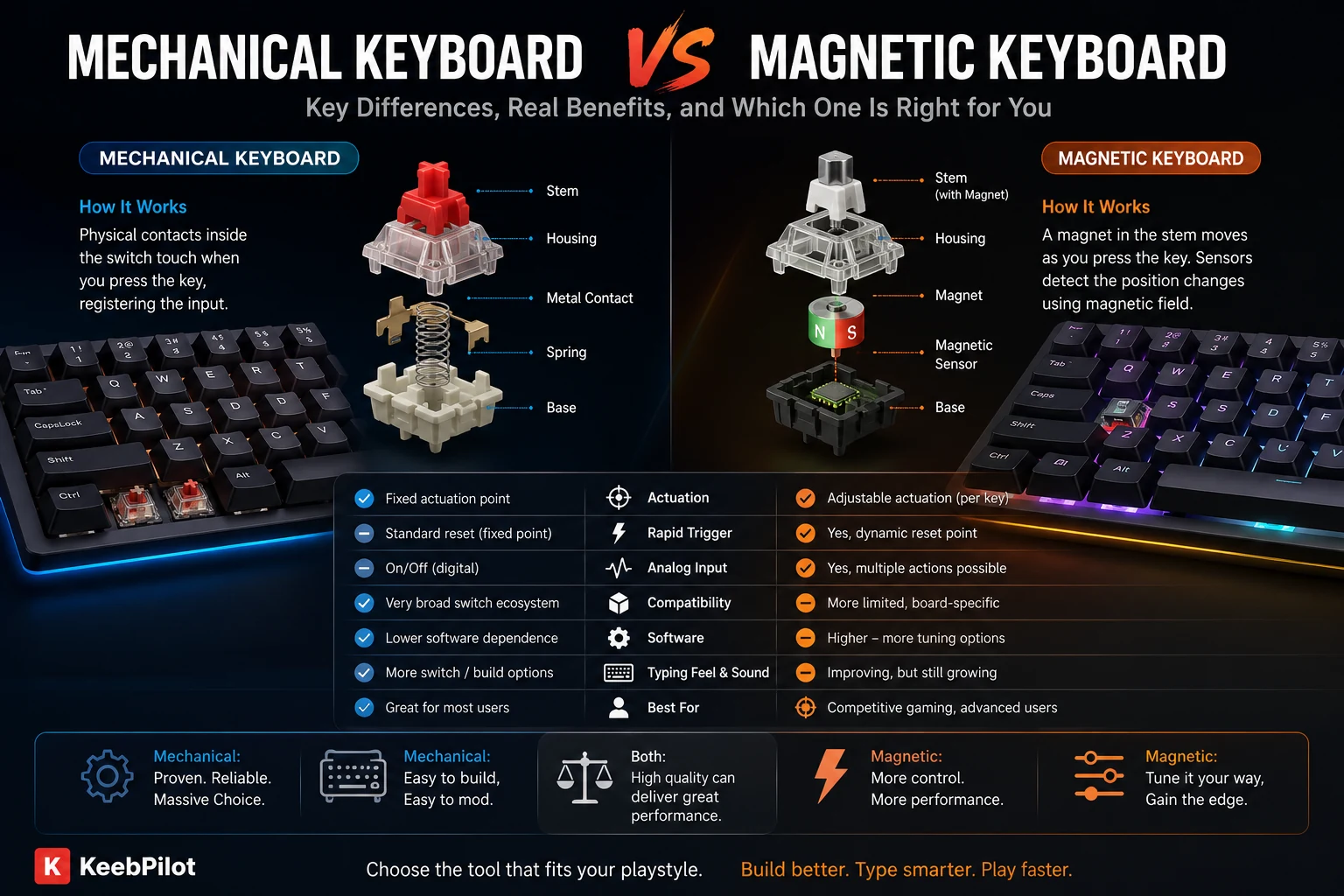
Mechanical Keyboard vs Magnetic Keyboard at a Glance
| Feature | Magnetic Keyboard | Mechanical Keyboard |
|---|---|---|
| Key detection | Magnetic position sensing | Physical electrical contacts |
| Actuation | Usually adjustable | Usually fixed by switch |
| Rapid Trigger | Common on gaming models | Normally unavailable |
| Analog key position | Possible | Normally no |
| Gaming tuning | Excellent | Good to excellent |
| Typing feel choices | Growing, but narrower | Extremely broad |
| Switch compatibility | Often platform-specific | Broad MX-style ecosystem |
| Hot swap | Possible, compatibility matters | Very common and standardized |
| Software dependence | Higher | Lower |
| Best fit | Competitive gaming, tuning | Typing, customization, general use |
The key point is that magnetic keyboards change what the keyboard can measure. A traditional mechanical switch mainly tells the PCB whether a circuit is open or closed. A magnetic system can measure where the key is within its travel range and let firmware decide what that position means.
How Mechanical and Magnetic Switches Work
A conventional mechanical switch such as a CHERRY MX uses physical contacts. Pressing the stem eventually brings the electrical contacts together, registering the keypress. CHERRY's MX designs, for example, use a predefined pre-travel distance before actuation.
A Hall Effect magnetic switch works differently. A magnet moves with the switch stem while a sensor on the PCB detects changes in the magnetic field. Because the keyboard can interpret those changes continuously, the point where the key activates does not have to be mechanically fixed.
If you want the deeper explanation first, read What Are Hall Effect Switches? How Magnetic Keyboard Switches Work.
That continuous position sensing is the foundation for most of the features that make magnetic keyboards interesting.
Adjustable Actuation Is the Biggest Practical Difference
On a traditional mechanical keyboard, the actuation point is largely determined by the switch itself.
With a magnetic keyboard, the actuation point can often be changed in software. You might configure:
- WASD to actuate very early for fast movement.
- Space to actuate deeper to reduce accidental presses.
- Typing keys to use a more conservative actuation point.
- Individual gaming keys differently depending on their role.
That makes a magnetic keyboard less like a fixed set of switches and more like an input system you can tune.
But a very shallow actuation point is not automatically better. The more sensitive you make a key, the easier it becomes to trigger accidentally. Competitive players may deliberately use aggressive settings, while normal typing can feel worse with the same configuration.
Rapid Trigger Is Where Magnetic Keyboards Pull Ahead for Gaming
Rapid Trigger is one of the strongest reasons competitive gamers consider magnetic keyboards.
A conventional mechanical key has fixed actuation and reset behavior. After pressing the key, it needs to move back far enough to reset before the next input can register.
Rapid Trigger can instead change the activation and reset point dynamically according to the direction of key movement. The key can reset and reactivate during its travel rather than needing to pass a conventional fixed reset point.
That matters most for repeated directional inputs, including:
- Counter-strafing.
- Fast A/D movement.
- Repeated key taps.
- Rhythm-sensitive movement.
- Quickly stopping and restarting character movement.
In those situations, reducing the amount of physical key travel needed between one input and the next can make keyboard movement feel noticeably more responsive.
That is a more meaningful distinction than simply looking at a marketing number such as polling rate.
Are Magnetic Keyboards Actually Faster?
They can be, but magnetic does not automatically mean faster than every mechanical keyboard.
Hall Effect switches avoid the electrical contact bounce associated with conventional mechanical contacts, and magnetic sensing gives firmware more flexibility over when an input activates and resets.
However, keyboard latency also depends on:
- PCB design.
- Firmware.
- Scan rate.
- Polling implementation.
- USB processing.
- Software configuration.
A well-designed mechanical gaming keyboard can already have extremely low latency.
So the more useful question is not:
“Is magnetic always faster?”
It is:
“Does this magnetic keyboard give me input behavior I cannot get from my current mechanical keyboard?”
For competitive gaming, Rapid Trigger and adjustable actuation can make the answer yes.
For ordinary typing and casual gaming, the difference may matter far less.
Magnetic vs Mechanical Keyboard for Gaming
For competitive gaming, especially FPS games, magnetic keyboards have the stronger argument.
They can offer:
- Adjustable actuation.
- Rapid Trigger.
- Per-key sensitivity settings.
- Multiple actions based on key travel on some boards.
- Analog-style input on supported implementations.
These features give players control over how a key responds, not just what the key does.
That is particularly useful for players who are willing to spend time configuring the keyboard.
A magnetic keyboard is less compelling if you buy it, leave every setting at default, and play games where extremely fast repeated movement inputs do not matter.
For RPGs, strategy games, casual gaming, general PC use, or slower-paced titles, a good mechanical keyboard remains entirely capable.
Gaming Winner: Magnetic
The advantage is strongest for players who will actually use adjustable input features.
Which Is Better for Typing?
For pure typing, the advantage shifts back toward mechanical keyboards.
Traditional mechanical switches have had decades to develop into a huge ecosystem. You can choose between:
- Light or heavy linear switches.
- Subtle or strong tactile switches.
- Clicky switches.
- Silent switches.
- Short-travel and long-travel switches.
- Different springs, stems, housings and materials.
The magnetic switch market is becoming more diverse, but compatibility and choice are still much more fragmented than the standard mechanical ecosystem.
Magnetic sensing also does not automatically make a keyboard feel better to type on.
Typing feel still depends heavily on:
- Spring weight.
- Stem design.
- Lubrication.
- Keycap profile.
- Plate.
- Mounting style.
- Case construction.
- Foam and acoustic tuning.
If your priority is a specific tactile bump, click, bottom-out feel or sound profile, conventional mechanical switches currently give you far more freedom.
Typing Winner: Mechanical
This is especially true for enthusiasts and users who care more about feel than input tuning.
Sound and Switch Customization
This is another area where mechanical keyboards remain stronger.
The MX-style ecosystem has become highly modular. Users can experiment with different switches, springs, lubricants, keycaps and keyboard constructions while retaining relatively predictable compatibility.
With magnetic keyboards, the fact that two switches physically fit into similar sockets does not necessarily mean they are electronically compatible.
This is an important difference that deserves more attention than it usually gets.
Can You Put Magnetic Switches in a Mechanical Keyboard?
Usually, no.
A magnetic switch requires a PCB with the correct magnetic sensing hardware. A conventional mechanical PCB is designed to detect electrical contact closure, so simply installing a magnetic switch does not convert it into a Hall Effect keyboard.
There is another complication: magnetic switch compatibility itself is not universal.
Different boards may depend on:
- Magnet polarity.
- Magnetic flux range.
- Sensor design.
- PCB thickness.
- Firmware calibration.
So do not treat magnetic hot swap like ordinary MX hot swap.
Before buying replacement magnetic switches, check the exact keyboard compatibility list.
Durability: Magnetic Has a Technical Advantage, but Both Can Last a Long Time
Traditional mechanical switches depend on electrical contacts that physically interact during operation.
Magnetic switches use contactless sensing for actuation, so the sensing mechanism itself does not depend on those contacts closing.
That gives magnetic technology a theoretical wear advantage.
But this does not mean mechanical switches are short-lived. Modern mechanical switches can be rated for tens of millions or even more than 100 million actuations, depending on the model.
These manufacturer ratings are best understood as durability specifications rather than a prediction of exactly how long your keyboard will survive.
In practical ownership, other parts of a keyboard can matter just as much:
- PCB reliability.
- USB connection.
- Stabilizers.
- Firmware support.
- Battery condition on wireless boards.
- Switch socket durability.
For most buyers, both technologies can offer far more switch life than they are likely to exhaust through normal use.
Mechanical Keyboards Still Have a Major Compatibility Advantage
If you enjoy changing switches regularly, this may matter more than Rapid Trigger.
Mechanical hot-swap keyboards generally have a broad, mature switch ecosystem. A compatible MX-style board can potentially work with switches from many different manufacturers.
Magnetic boards are moving toward a larger aftermarket, but there still isn't one universal magnetic-switch standard.
That means a magnetic keyboard can be highly customizable in software while simultaneously being more limited in hardware.
This is one of the easiest distinctions to miss:
Mechanical keyboards usually offer more hardware freedom.
Magnetic keyboards usually offer more actuation and input-behavior freedom.
Which type of customization matters more to you should influence your choice.
What About TMR Magnetic Keyboards?
Hall Effect is no longer the only magnetic sensing technology worth knowing.
TMR, or Tunnel Magnetoresistance, is another magnetic sensing approach now appearing in keyboard products. These keyboards can still support features such as adjustable actuation and Rapid Trigger, but the sensing technology is different from Hall Effect.
This means the market is evolving toward a broader category:
- Hall Effect magnetic keyboards.
- TMR magnetic keyboards.
- Potentially other magnetic sensing implementations.
So when shopping, don't assume the word magnetic automatically identifies the exact sensing technology.
For most buyers, however, the practical decision remains similar: magnetic keyboards emphasize adjustable input behavior, while conventional mechanical keyboards emphasize mature switch choice and customization.
Which One Should You Buy?
Choose a magnetic keyboard if:
- You play competitive FPS games.
- Rapid Trigger is useful for the games you play.
- You want adjustable actuation.
- You like tuning each key in software.
- You want analog or multi-stage key functions.
- You understand that switch compatibility may be limited.
Choose a mechanical keyboard if:
- Typing feel matters more than Rapid Trigger.
- You want tactile or clicky switch variety.
- You frequently experiment with different switches.
- You want the broadest hot-swap ecosystem.
- You prefer a keyboard that works well without extensive software configuration.
- You already own a good mechanical board and don't need magnetic-specific features.
For many people, neither technology makes the other obsolete.
A magnetic keyboard is a specialized upgrade when you value control over actuation and reset behavior.
A mechanical keyboard remains an excellent choice when you value feel, sound, switch variety and hardware customization.
Mechanical Keyboard vs Magnetic Keyboard: Final Verdict
The mechanical keyboard vs magnetic keyboard decision comes down to what you want to customize.
Magnetic keyboards let you customize when and how a key activates. Adjustable actuation and Rapid Trigger make that especially valuable for competitive gaming.
Mechanical keyboards let you customize how the keyboard physically feels and sounds, backed by a much larger and more mature switch ecosystem.
For competitive gaming, magnetic has the edge.
For typing, enthusiast builds and switch experimentation, mechanical remains the safer choice.
And if you already have a quality mechanical keyboard that you enjoy, you do not need to replace it simply because magnetic keyboards are newer.
FAQ
Is a magnetic keyboard better than a mechanical keyboard?
Not universally. Magnetic keyboards are better suited to adjustable actuation, Rapid Trigger and competitive gaming features. Mechanical keyboards generally offer greater switch variety, easier hardware customization and more typing-feel options.
Are magnetic keyboards faster than mechanical keyboards?
Magnetic sensing can remove conventional contact debounce and enable Rapid Trigger, but total keyboard latency also depends on firmware, scanning and implementation. A magnetic keyboard is not automatically faster than every mechanical keyboard.
Are Hall Effect switches mechanical switches?
They still contain moving mechanical components such as a stem and spring, but their input sensing method is different. Traditional mechanical switches register through electrical contacts, while Hall Effect switches use a magnet and sensor.
Can magnetic switches be hot-swapped?
Some magnetic keyboards support hot swapping, but compatibility is much more model-specific than ordinary MX mechanical hot swap. Always confirm polarity, sensor and switch compatibility with the keyboard manufacturer.
Are magnetic keyboards good for typing?
Yes, but magnetic sensing itself does not guarantee better typing feel. Mechanical keyboards currently provide a broader choice of linear, tactile, clicky and silent switch characteristics.
Is Rapid Trigger useful outside gaming?
It can be used outside gaming, but its strongest benefit is in situations requiring rapid repeated key activation and reset. For ordinary writing and office work, adjustable Rapid Trigger behavior is generally much less important than it is for competitive gameplay.