
Understanding keyboard switch types used to be fairly straightforward. You picked between a linear, tactile, or clicky mechanical switch, often identified by familiar names such as Red, Brown, or Blue.
That is no longer the whole picture.
Modern keyboards can use traditional mechanical contacts, Hall Effect magnetic sensing, optical detection, or electrostatic capacitive systems. Within mechanical switches, you still have linear, tactile, and clicky feel. Then there are additional characteristics such as silent, low-profile, speed, spring weight, travel distance, and hot-swap compatibility.
That is why two switches can both be called “linear” while working in completely different ways.
The easiest way to understand today's keyboard switch market is to separate it into three layers:
- Switch technology — how the keypress is detected.
- Switch feel — what the press feels and sounds like.
- Switch characteristics — height, force, travel, noise reduction and compatibility.
Once those three layers are separated, the hundreds of switch names on the market become much easier to understand.
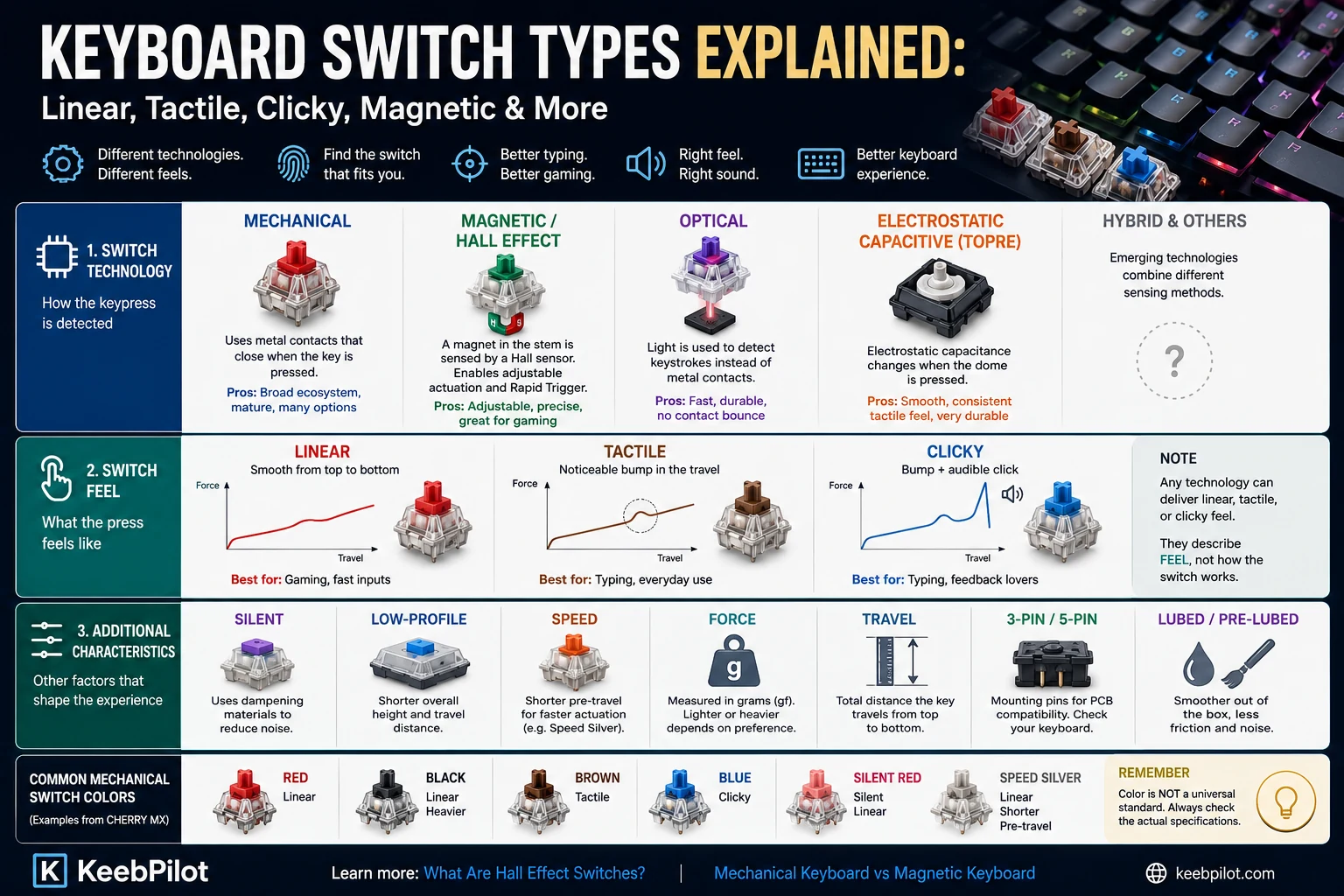
Keyboard Switch Types at a Glance
| Type | What Defines It | Feel | Main Advantage | Common Use |
|---|---|---|---|---|
| Linear | Mechanical feel | Smooth | Consistent key travel | Gaming, general use |
| Tactile | Mechanical feel | Noticeable bump | Physical feedback | Typing, mixed use |
| Clicky | Mechanical feel | Bump + click | Strong feedback | Typing, enthusiasts |
| Magnetic / Hall Effect | Sensing technology | Usually linear, but not always | Adjustable actuation | Competitive gaming |
| Optical | Sensing technology | Linear or clicky | Contactless optical actuation | Gaming |
| Electrostatic capacitive | Sensing technology | Usually soft tactile | Contactless sensing | Typing |
| Silent | Acoustic characteristic | Linear or tactile | Reduced switch noise | Office, shared spaces |
| Low-profile | Physical form factor | Varies | Reduced keyboard height | Thin keyboards |
| Speed | Travel characteristic | Usually linear | Shorter actuation travel | Gaming |
The most important thing to notice in this keyboard switch chart is that these categories overlap.
A switch can be:
mechanical + linear + silent
or:
magnetic + tactile
or:
optical + clicky
So terms such as “linear” and “Hall Effect” are not competing labels. They describe different aspects of the same switch.
What Is a Keyboard Switch?
A keyboard switch is the mechanism beneath a keycap that turns a physical keypress into an input the keyboard can detect.
On a traditional mechanical switch, pressing the key moves a stem and compresses a spring. At a defined point in the travel, electrical contacts close and the keyboard registers the keypress. Current CHERRY MX switches still use this basic mechanical-contact architecture while offering different linear, tactile, clicky and silent variants.
Other keyboard technologies detect the keypress differently.
Hall Effect keyboards track the movement of a magnet relative to a sensor. Optical keyboards use light for actuation. Electrostatic capacitive keyboards such as Topre-based boards detect changes in capacitance rather than relying on a conventional metal contact closing.
These differences affect what the keyboard can do, but they do not automatically determine how a switch feels under your finger.
The Three Main Mechanical Keyboard Switch Types
When people talk about mechanical keyboard switch types, they are usually referring to three feel categories:
- Linear
- Tactile
- Clicky
These categories describe what happens during the keypress, not the brand printed on the switch.
Linear Switches
A linear switch moves smoothly from the top of its travel to the bottom without a deliberate tactile bump or audible click at the actuation point.
That simple feel is one reason linear switches are common in gaming keyboards. There is no tactile event to move through repeatedly, and manufacturers can tune them with different spring weights and travel distances.
CHERRY MX Red and MX Black are familiar examples. Both are linear, but they do not feel identical: MX Black is generally heavier than MX Red.
Linear switches are worth considering if you:
- Prefer a smooth keypress.
- Play games requiring repeated key inputs.
- Do not want a tactile bump.
- Want access to a very large range of switch options.
One misconception is that linear automatically means quiet.
It does not.
A normal linear switch can still be loud when the stem bottoms out or returns upward. A genuinely silent linear switch uses additional damping features to reduce those noises.
Tactile Switches
Tactile switches add a noticeable increase in resistance during the keypress.
This creates a tactile bump that lets your finger feel part of the switch's travel more clearly.
Unlike clicky switches, tactile switches do not necessarily generate a deliberate click sound.
CHERRY MX Brown is the familiar example: tactile feedback without the click associated with MX Blue.
Tactile switches vary enormously. Some have a light bump that is easy to pass through. Others produce a much stronger tactile event and require noticeably more force.
That means “tactile” tells you the basic behavior, but not exactly how strong the feedback will be.
Tactile switches are worth considering if you:
- Want physical feedback during a press.
- Type frequently.
- Do not want the deliberate noise of a clicky switch.
- Prefer more resistance than many light linears.
- Want a middle ground between smooth and clicky.
Clicky Switches
Clicky switches combine tactile feedback with a deliberate audible click.
CHERRY MX Blue is the classic example. The switch produces both a physical response and a designed acoustic event during the keystroke.
That sound is not simply the keycap hitting the keyboard.
The result is a very distinct typing experience.
Clicky switches are worth considering if you:
- Enjoy strong feedback.
- Like audible confirmation of a keypress.
- Primarily use the keyboard in a private environment.
- Prefer a more deliberate typing experience.
The obvious disadvantage is noise.
A clicky switch that feels great at home may be a poor choice for an open office, shared bedroom, streaming setup, or late-night use.
Linear vs Tactile vs Clicky
If you are only comparing traditional mechanical switches, start here:
| Feature | Linear | Tactile | Clicky |
|---|---|---|---|
| Smooth travel | Yes | No | No |
| Tactile bump | No | Yes | Yes |
| Deliberate click | No | No | Yes |
| Typical noise | Low–medium | Low–medium | High |
| Common gaming use | High | High | Lower |
| Common typing use | High | High | Preference-dependent |
There is no universally superior choice.
A linear switch is not automatically “for gamers,” and a tactile switch is not automatically “for typists.”
Typing feel is subjective, and modern switch design has blurred many of the old boundaries.
The better approach is to treat linear, tactile, and clicky as descriptions of feedback, then look separately at force, travel and sound.
Magnetic and Hall Effect Switches
Magnetic switches represent a different category because the defining difference is not their tactile feel — it is how the keyboard detects movement.
In a Hall Effect keyboard, a magnet in or around the moving switch stem interacts with a Hall sensor on the PCB. As the stem moves, the magnetic field changes, allowing the keyboard to measure key position without relying on the traditional metal-contact closure used by a conventional mechanical switch.
That continuous positional information can enable:
- Adjustable actuation
- Rapid Trigger
- Per-key actuation settings
- Multi-stage inputs
Most early Hall Effect switches were linear, which is why “magnetic” is sometimes incorrectly treated as another word for “linear.”
That is increasingly inaccurate. Tactile and silent magnetic switches now exist, so a modern switch can be:
Hall Effect by sensing technology, tactile by feel.
If you want the deeper technical explanation, read What Are Hall Effect Switches? How Magnetic Keyboard Switches Work.
For a broader technology comparison, see Mechanical Keyboard vs Magnetic Keyboard: Which Should You Choose?.
Are Magnetic Switches the Same as Mechanical Switches?
Not in terms of electrical sensing.
A traditional mechanical switch normally registers through physical electrical contacts. A Hall Effect switch uses magnetic sensing instead.
However, magnetic keyboard switches still contain moving physical components such as stems, springs and housings.
That is why the terminology can get confusing.
A clearer way to think about it is:
Traditional mechanical switch
→ mechanical movement + electrical contacts.
Hall Effect magnetic switch
→ mechanical movement + magnetic position sensing.
The key difference is the sensing system.
Can Magnetic Switches Go Into a Normal Mechanical Keyboard?
Usually not.
Magnetic switches require compatible sensing hardware on the keyboard PCB. Installing a magnetic switch into a conventional mechanical PCB does not add Hall Effect sensing.
Even among magnetic keyboards, compatibility should not be assumed. Polarity, sensor design, magnet strength and firmware calibration can differ.
This makes magnetic hot-swap ecosystems different from conventional MX-style mechanical hot swap.
Always check the exact keyboard and switch compatibility rather than judging by whether the switch physically fits.
Optical Keyboard Switches
Optical switches replace the traditional metal-contact actuation method with optical sensing.
A beam of light or optical sensor is used to detect the switch movement instead of relying on conventional metal contacts closing.
Again, notice the classification:
Optical describes the sensing system.
Linear, tactile or clicky describes the feel.
So “optical vs linear” is not a useful comparison. An optical switch itself can be linear.
Optical switches are especially common in gaming keyboards, but they typically require a keyboard designed for that specific optical platform.
They should not be assumed to work in a normal mechanical hot-swap PCB.
Electrostatic Capacitive and Topre Switches
Topre-based keyboards occupy another category.
Their electrostatic capacitive mechanism detects a change in capacitance as the key is pressed rather than using the conventional MX-style metal contact closure.
The resulting feel is often associated with a soft tactile response.
This makes Topre another example of why modern types of keyboard switches cannot be reduced to only linear, tactile and clicky.
Those three terms describe feel.
Topre describes a technology.
What Are Silent Switches?
“Silent” is another label that is often mistaken for a separate switch technology.
It is better understood as an acoustic characteristic.
A silent switch uses internal design features intended to reduce the sound generated near the bottom and/or top of the stroke.
This means:
- A silent switch can be linear.
- A silent switch can be tactile.
- A silent switch can be mechanical.
- A silent switch can be magnetic.
Silent switches are particularly useful for offices, shared rooms and setups where microphone noise matters.
But “silent” does not mean literally silent.
Keycaps, stabilizers, the plate, case construction and typing force still contribute to the final sound of a keyboard.
What Are Low-Profile Switches?
Low-profile switches reduce the physical height and usually the travel of the switch compared with standard-height desktop mechanical switches.
They are commonly used when manufacturers want:
- A thinner keyboard.
- Reduced overall key height.
- Shorter travel.
- A more laptop-like hand position while retaining discrete switches.
But “low-profile” tells you nothing by itself about feedback.
Low-profile switches can still be:
- Linear.
- Tactile.
- Clicky.
- Magnetic.
So it belongs in the physical-design layer of switch classification, not alongside linear and tactile as a competing feel category.
What Are Speed Switches?
A speed switch is generally designed around shorter pre-travel or other characteristics intended to register a keypress sooner in the physical stroke.
CHERRY MX Speed Silver is a familiar example of a linear switch positioned around shorter pre-travel.
That makes a speed switch another overlapping category:
Speed Silver = mechanical + linear + short-pre-travel-oriented.
It is not a completely separate sensing technology.
With modern Hall Effect keyboards, fixed “speed switch” terminology becomes less important because compatible magnetic systems can often change the actuation point in software.
What Do Keyboard Switch Colors Mean?
This is one of the most common sources of confusion for beginners.
Historically, CHERRY's color system established several familiar associations:
| Common CHERRY Color | Switch Feel |
|---|---|
| Red | Linear |
| Black | Linear |
| Brown | Tactile |
| Blue | Clicky |
| Silent Red | Silent linear |
| Speed Silver | Linear / speed-oriented |
But keyboard switch colors are not a universal standard.
A red switch from another manufacturer may resemble the general idea of an MX Red, but you cannot safely infer exact spring weight, travel, materials or sound simply from the color.
The modern enthusiast market also uses names such as Jade, Banana, Oil King, Peach, Lime and many others that do not follow a universal color code.
The safest approach is:
Use color as a product name, not as a complete specification.
Always check the actual switch data.
The Specifications That Matter More Than Color
Once you know whether you want linear, tactile or clicky feedback, switch specifications become much more useful.
Operating Force
Operating force describes how much force is associated with operating the switch.
Lighter switches can feel effortless but may also be easier to press accidentally.
Heavier switches provide more resistance.
Force preferences vary widely, so two linear switches can feel dramatically different despite belonging to the same category.
Pre-Travel or Actuation Distance
This is the distance a key moves before the keyboard registers the press.
Traditional mechanical switches generally have a fixed actuation point determined by the switch design.
Compatible Hall Effect systems can instead make the effective actuation point software-adjustable.
Total Travel
Total travel is the full distance the stem can move.
A switch with short total travel can feel very different from a long-travel switch even if both are linear and have similar operating force.
Bottom-Out Force
Some switches become progressively heavier as the spring compresses.
For that reason, actuation force alone does not always describe the full typing feel.
Factory Lubrication
Many modern switches are pre-lubed to reduce friction and alter their sound and smoothness.
Factory lubrication is now common across both traditional and magnetic switch designs.
What Do 3-Pin and 5-Pin Switches Mean?
For conventional MX-style mechanical switches, pin terminology generally relates to how the switch mounts and aligns with the PCB and plate.
A 5-pin configuration normally adds plastic locating pins compared with a 3-pin switch.
This is primarily a compatibility and mounting consideration — it does not tell you whether the switch is linear, tactile or clicky.
Before buying loose switches, check your keyboard's PCB and plate compatibility rather than assuming every MX-style switch will install without modification.
How to Choose Between Different Types of Keyboard Switches
Instead of beginning with brands or colors, use a simple sequence.
1. Choose the sensing technology
Ask whether you specifically need:
Traditional mechanical
- Broad switch ecosystem.
- Mature MX-style compatibility.
- Huge choice of feel and sound.
Magnetic / Hall Effect
- Adjustable actuation.
- Rapid Trigger.
- Software-controlled input behavior.
Optical
- Optical actuation.
- Platform-specific gaming implementations.
Electrostatic capacitive
- Distinct contactless tactile typing experience.
If you have no specific need for magnetic or optical features, traditional mechanical switches remain the easiest ecosystem to explore.
2. Choose the feel
If you choose conventional mechanical switches:
Linear
Choose this if you want smooth travel.
Tactile
Choose this if you want to feel a bump.
Clicky
Choose this if you want both tactile and audible feedback.
This single choice narrows hundreds of switches into a much more manageable group.
3. Choose the force
Then decide whether you prefer:
- Light
- Medium
- Heavy
Do not assume lighter is automatically faster or better.
A very light switch may feel responsive but can also increase unintended presses for some users.
4. Consider noise
If other people share the room, noise can matter more than actuation specifications.
Consider:
- Silent linear.
- Silent tactile.
- Normal linear.
- Normal tactile.
A clicky switch should generally be a deliberate choice rather than an accidental purchase.
5. Check compatibility
Finally, confirm:
- Mechanical vs magnetic PCB.
- 3-pin vs 5-pin support where relevant.
- Hot-swap socket type.
- Low-profile vs standard-height platform.
- Magnetic polarity and board-specific HE support where relevant.
Compatibility is especially important with magnetic switches, where physically similar-looking switches are not necessarily interchangeable.
Which Keyboard Switch Type Is Best for Gaming?
There is no single gaming switch type that is best for every player.
Traditional linear switches remain widely used because of their smooth movement.
Magnetic Hall Effect switches add another dimension by allowing actuation and reset behavior to be controlled through software, which can matter in competitive games that benefit from rapid repeated directional inputs.
Optical switches are another gaming-oriented option.
The useful distinction is therefore not simply:
Red vs Brown vs Blue.
It is:
Do you need a particular feel, or do you need a particular input capability?
Those are different buying decisions.
Which Keyboard Switch Type Is Best for Typing?
Typing preferences are even more personal.
A tactile switch can provide clear physical feedback without the deliberate noise of a clicky switch.
Linear switches can feel smooth and fluid.
Clicky switches provide strong audible and physical feedback.
Electrostatic capacitive switches such as Topre add another distinct tactile option.
The most reliable way to choose is to test actual switches whenever possible.
Two tactile switches from different product families can feel more different from one another than their shared “tactile” label suggests.
Keyboard Switch Types: The Simple Way to Remember Them
The modern switch market becomes much easier to understand when you stop putting every label into one list.
Think of a switch as a combination:
Technology
Mechanical / Magnetic / Optical / Electrostatic capacitive
+
Feel
Linear / Tactile / Clicky
+
Characteristics
Silent / Low-profile / Speed / Force / Travel / Lubrication / Mounting
For example:
CHERRY MX2A Red
Traditional mechanical + Linear + Standard profile
CHERRY MX2A Brown
Traditional mechanical + Tactile + Standard profile
CHERRY MX2A Silent Red
Traditional mechanical + Linear + Silent
Gateron Magnetic Jade Pro
Hall Effect magnetic + Linear + Adjustable actuation
That framework is far more useful than memorizing dozens of switch colors.
FAQ
What are the main keyboard switch types?
Traditional mechanical switches are mainly divided by feel into linear, tactile and clicky. Modern keyboards can also use different sensing technologies, including Hall Effect magnetic, optical and electrostatic capacitive switches.
What are the three types of mechanical keyboard switches?
The three basic mechanical switch feel categories are linear, tactile and clicky. Linear switches are smooth, tactile switches provide a physical bump, and clicky switches combine tactile feedback with an intentional audible click.
What is the difference between red, brown and blue switches?
In the CHERRY MX system, Red is linear, Brown is tactile without a click, and Blue is tactile with an audible click. Other manufacturers may use similar color conventions, but color should not be treated as a universal specification.
Are Hall Effect switches mechanical?
Hall Effect switches contain moving physical components such as a stem and spring, but they do not use the same electrical contact-sensing method as traditional mechanical switches. The keyboard detects changes in a magnetic field through a Hall sensor instead.
Are magnetic switches always linear?
No. Many magnetic switches are linear, but tactile magnetic switches also exist.
Can I put any switch in a hot-swappable keyboard?
No. You still need to check the keyboard's socket and switch technology. Conventional mechanical hot-swap boards do not normally accept Hall Effect switches, and magnetic-switch compatibility can also vary between HE platforms.
Are silent switches a separate switch type?
Not really. “Silent” describes noise-reduction characteristics and can overlap with other categories. A silent switch may be linear, tactile, mechanical or magnetic.
Which keyboard switch should a beginner choose?
Start by deciding whether you prefer smooth, tactile, or clicky feedback. Then compare force and noise. Only prioritize magnetic, optical or other sensing technologies if their specific features matter to how you use the keyboard.