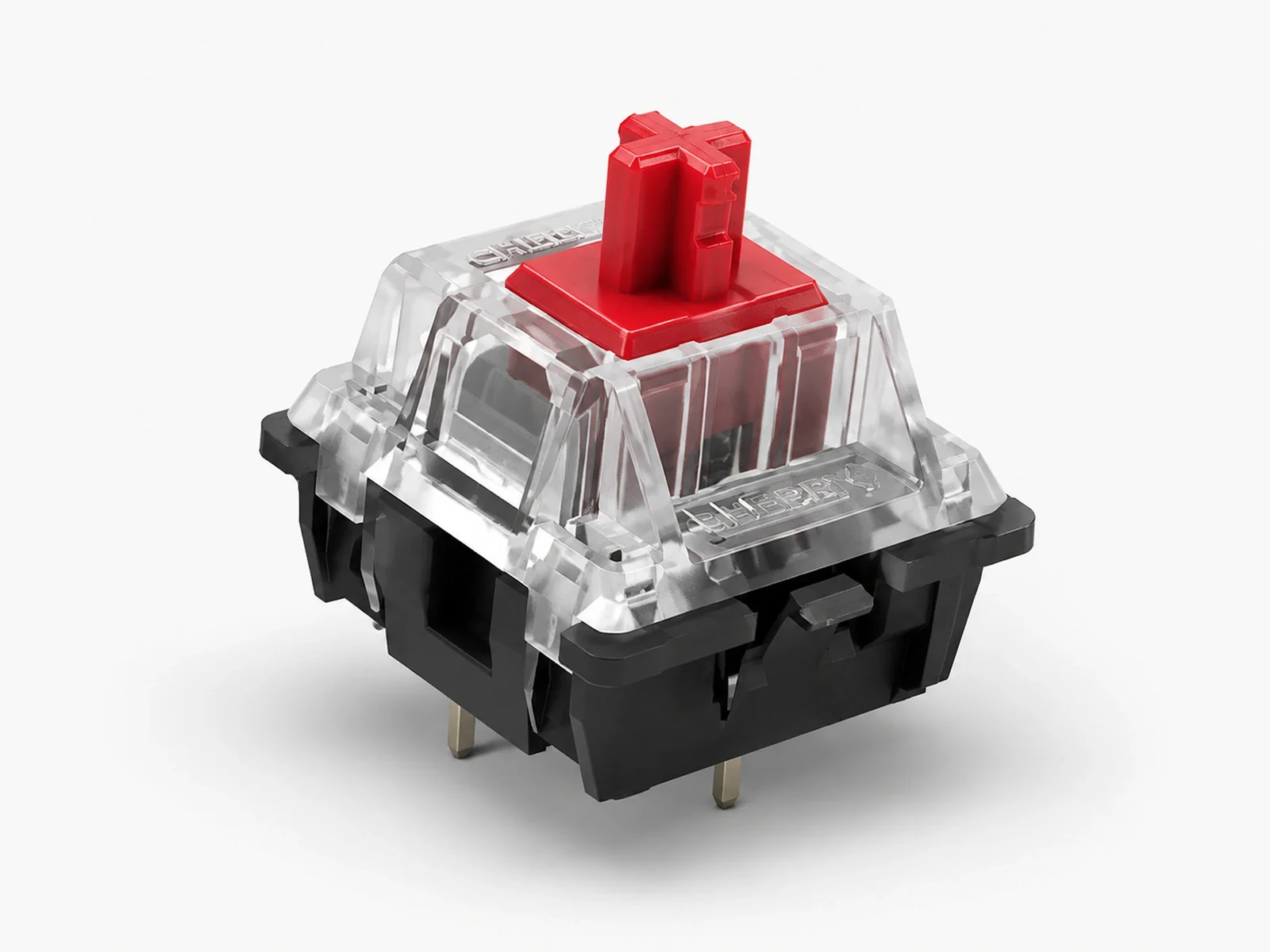
Linear

CHERRY MX2A 3-Pin Mechanical Keyboard Switches

CHERRY Linear 3-pin Factory Lubed
At a glance

Key specifications

The most important verified numbers for this product, shown before the deeper sections.

45 gfOperating force
4 mmTotal travel
LinearSwitch type
3-pinMount
PartiallyFactory lubed
POMStem material
Varies by switch: Blue clicky; Brown tactile; Red, Black and Silver non-clicky.Sound profile
Character

Sound & feel

How this product sounds and feels to type on, described in plain terms.

Sound profile

The five switch choices are mechanically different, not merely different stem colors. Red and Black are linear, Brown adds a light tactile event without an audible click, Blue combines tactility with an intentional click, and Speed Silver shortens the actuation distance. That means the switch variant should be chosen for feel first, while pack size should be chosen for keyboard layout.

Typing feel

Red is the balanced reference at 45 cN and 2.0 mm pre-travel. Black raises actuation to 60 cN for a firmer press, while Speed Silver keeps 45 cN but actuates at 1.2 mm. Brown adds tactile feedback without the Blue switch's click, making it easier to use in shared spaces where strong acoustic feedback is undesirable.

Fit & build

Compatibility & build notes

What to check before ordering, and how the build is put together.

Linear 3-pin PCB Mount Partially Factory Lubed POM Stem

Compatibility

A three-pin switch uses the central plastic post and electrical contacts without the two extra side locating legs found on five-pin PCB-mount housings. That makes this version a practical choice for many plate-supported custom keyboards and hot-swap boards that accept standard MX geometry. Compatibility still depends on the actual socket, PCB cutout and plate design, so the keyboard specification should be checked first. This product is available in 10, 30, 50, 60, 70, 90, 100 and 110-switch packs. Ten and thirty are useful for testing or partial replacements, while 70, 90 and 110 are practical full-build quantities for many 65%, 75% and full-size layouts. 3-pin mount — confirm PCB and plate support for your board.

Build notes

Three-pin housings omit the two side PCB locating legs used by five-pin versions. Hot-swap compatibility depends on the keyboard socket and PCB, not only the switch family. The eight pack sizes support testing, partial replacement and complete keyboard builds without custom quantity math.

Fit & trade-offs

Decide quickly whether this product fits your build

A strong fit if you want

Plate-supported builds using standard MX footprints where a three-pin housing is the safer physical fit.
Users comparing classic CHERRY Red, Brown, Blue, Black and Speed Silver typing profiles.
Builders who want one product page for switch choice and multiple practical pack quantities.

Consider alternatives if you prefer

A different switch type

If you need tactile feedback or a silent build, compare other families.

A specific force target

Pick a switch whose operating force matches your preference.

Another build use case

Match the product to how and where you actually type.

Sizing help

How many switches do you need?

Switch count depends on your keyboard's layout. The typical ranges below are a starting point — the exact number depends on the specific model and any extra keys.

60% 61 – 68 keys
65% 66 – 75 keys
75% 81 – 88 keys
TKL 87 – 92 keys
Full-size 104 – 110 keys

This product is available in packs of 10 / 30 / 50 / 60 / 70 / 90 / 100 / 110 switches — pick a pack that covers your layout with a small margin for testing or replacements.

Exact switch count depends on keyboard model / layout (and any novelties or extra keys). Always confirm against your board's official key count before ordering.

Product deep dive

Understand the product before you choose it

Focused sections explain the details buyers care about, supported by the product's specification data.

CHERRY MX2A 3-Pin Mechanical Keyboard Switches — Five Familiar CHERRY Profiles, One Three-Pin Format
TYPING FEEL & SOUND

Five Familiar CHERRY Profiles, One Three-Pin Format

The five switch choices are mechanically different, not merely different stem colors. Red and Black are linear, Brown adds a light tactile event without an audible click, Blue combines tactility with an intentional click, and Speed Silver shortens the actuation distance. That means the switch variant should be chosen for feel first, while pack size should be chosen for keyboard layout.

Red is the balanced reference at 45 cN and 2.0 mm pre-travel. Black raises actuation to 60 cN for a firmer press, while Speed Silver keeps 45 cN but actuates at 1.2 mm. Brown adds tactile feedback without the Blue switch's click, making it easier to use in shared spaces where strong acoustic feedback is undesirable.

  • Red and Black are both linear, but Black requires more force at actuation.
  • Speed Silver reduces pre-travel to 1.2 mm and total travel to 3.4 mm.
  • Brown gives tactile feedback without a click; Blue adds a deliberate audible click.
Start with Red for a neutral linear reference, then choose Black for weight, Silver for speed, Brown for tactility, or Blue for click feedback.
CONSTRUCTION & SPECS

MX2A Updates Motion Control Around the Classic Contact System

MX2A keeps the familiar CHERRY MX layout while refining stem and spring guidance. For buyers, the useful takeaway is improved consistency across the classic switch profiles—not a new switch format to learn.

The black-housing three-pin version uses a POM stem, a barrel-shaped spring and lubrication around the cylindrical guide area. Housing polymer grades can differ between opaque black and transparent RGB versions.

  • MX Gold Crosspoint contacts remain the electrical foundation of current full-height MX2A switches.
  • Spring-centering and polished guidance are intended to make vertical movement more controlled and repeatable.
  • Black-housing materials follow the confirmed three-pin specification rather than the transparent RGB version.
The important MX2A changes are guidance, spring control and contact consistency, with housing materials kept to the confirmed black-housing specification.
CHERRY MX2A 3-Pin Mechanical Keyboard Switches — MX2A Updates Motion Control Around the Classic Contact System
CHERRY MX2A 3-Pin Mechanical Keyboard Switches — Three-Pin Mounting Works Best With Plate-Supported Builds
BUILD FIT & QUANTITY

Three-Pin Mounting Works Best With Plate-Supported Builds

A three-pin switch uses the central plastic post and electrical contacts without the two extra side locating legs found on five-pin PCB-mount housings. That makes this version a practical choice for many plate-supported custom keyboards and hot-swap boards that accept standard MX geometry. Compatibility still depends on the actual socket, PCB cutout and plate design, so the keyboard specification should be checked first.

This product is available in 10, 30, 50, 60, 70, 90, 100 and 110-switch packs. Ten and thirty are useful for testing or partial replacements, while 70, 90 and 110 are practical full-build quantities for many 65%, 75% and full-size layouts.

  • Three-pin housings omit the two side PCB locating legs used by five-pin versions.
  • Hot-swap compatibility depends on the keyboard socket and PCB, not only the switch family.
  • The eight pack sizes support testing, partial replacement and complete keyboard builds without custom quantity math.
Choose three-pin for the board and plate first, then select a pack that covers the layout plus a few sensible spare switches.
COMPARE ALTERNATIVES

Compare Three-Pin Fit Against the Five-Pin RGB Version

Choose this three-pin product when your keyboard uses a plate-supported layout, when the PCB does not accept the two extra locating legs, or when you prefer the black-housing appearance. The five-pin RGB product is the alternative when the board accepts PCB-mount locating pins and transparent housings are useful for under-switch lighting.

The feel decision remains separate from the mount decision. Red, Brown, Blue, Black and Speed Silver are available here, while the five-pin RGB product also adds Silent Red. If quiet typing is the priority, compare Silent Red before choosing a standard linear. If earlier actuation matters more, compare Speed Silver; for heavier resistance, compare Black against the Red baseline.

  • Three-pin favors plate-supported compatibility; five-pin adds two locating legs for compatible PCBs.
  • The five-pin RGB product adds a transparent lighting-oriented housing and Silent Red option.
  • Red is the most useful baseline when comparing force and travel across both product structures.
Choose mount and lighting needs first, then use switch profile to tune resistance, tactility, click feedback, actuation speed or quietness.

CHERRY MX2A 3-Pin Mechanical Keyboard Switches — Compare Three-Pin Fit Against the Five-Pin RGB Version
Decision support

Compare CHERRY MX2A 3-Pin Mechanical Keyboard Switches with realistic alternatives

The goal is to make the key trade-offs visible: weight, travel, stock preparation, sound direction, and the type of user each product serves best.

Open full comparison →
Specifications
Current product
CHERRY MX2A 3-Pin Mechanical Keyboard Switches

CHERRY MX2A 3-Pin Mechanical Keyboard Switches

CHERRYLinear
CHERRY MX2A 5-Pin Mechanical Keyboard Switches

CHERRY MX2A 5-Pin Mechanical Keyboard Switches

CHERRYVaries by selected switch
Type
Linear
Varies by selected switch
Operating Force
45
Varies by selected switch
Bottom-out Force
Total Travel
4
Varies by selected switch
Sound Profile
Varies by switch: Blue clicky; Brown tactile; Red, Black and Silver non-clicky.
Blue is the explicitly clicky option, Brown is tactile without the same click, Red/Black/Speed Silver/Orange are linear mechanisms, and Silent Red is designed for reduced typing noise.
Factory Lubed
Partially
Varies by selected switch
Mount
3-pin
5-pin
Stem Material
POM
Varies by selected switch
Best For
Structured product data

Detailed specifications

General

Brand
CHERRY
Switch type
Linear
Mount
3-pin
Factory lubed
Partially

Performance

Operating force
45
Pre-travel
2
Total travel
4
Spring
Barrel spring
Sound profile
Varies by switch: Blue clicky; Brown tactile; Red, Black and Silver non-clicky.
Typing feel
Default Red is smooth and direct; child variations change force, travel, tactility and click behavior.

Construction

Stem material
POM

Compatibility

PCB mount
3-pin
In the box

What's in the box

Exactly what ships with this product. The switch count and color update with the options you select.

Selected pack
10 switchs
  • Included switches10 switchs
  • Selected colorRed
Product-specific FAQ

Frequently Asked Questions

Straight answers to the questions that most often decide a purchase.

Three-pin housings use the central fixing post and electrical contacts without the two additional side locating legs found on five-pin versions. They are commonly aligned by a keyboard plate. Five-pin housings add PCB locating support on compatible boards. Always confirm the PCB and hot-swap socket before ordering a complete set.
This listing includes Red, Brown, Blue, Black and Speed Silver. Red, Black and Speed Silver are linear profiles; Brown is tactile without an audible click; Blue is tactile and clicky. The options are mechanically different, so the color selector also changes the relevant force, travel and feedback characteristics.
Both are linear with 2.0 mm pre-travel and 4.0 mm total travel, but Red actuates at 45 cN while Black actuates at 60 cN. Red is therefore the lighter baseline, while Black produces a firmer keypress and stronger resistance. Choose based on how much spring weight you prefer.
Brown gives tactile feedback without an audible click and uses 45 cN nominal actuation. Blue combines tactile feedback with a click and uses 50 cN actuation with 2.2 mm pre-travel. Blue is much more noticeable acoustically, while Brown is easier to place in shared work or mixed-use environments.
Speed Silver keeps a 45 cN actuation force but shortens pre-travel to 1.2 mm and total travel to 3.4 mm, compared with Red at 2.0 mm and 4.0 mm. That earlier actuation suits users who deliberately want a faster response, while Red provides a more conventional full-travel linear feel.
They can work in hot-swap keyboards when the socket, PCB footprint and plate are designed for standard CHERRY MX geometry. Hot-swap compatibility is not guaranteed by the three-pin label alone. Check the keyboard manufacturer's switch compatibility and make sure the socket accepts the physical housing before buying a full pack.

Ready to build with CHERRY MX2A 3-Pin Mechanical Keyboard Switches?

Choose the option for your build, add it to your cart, or compare before ordering.